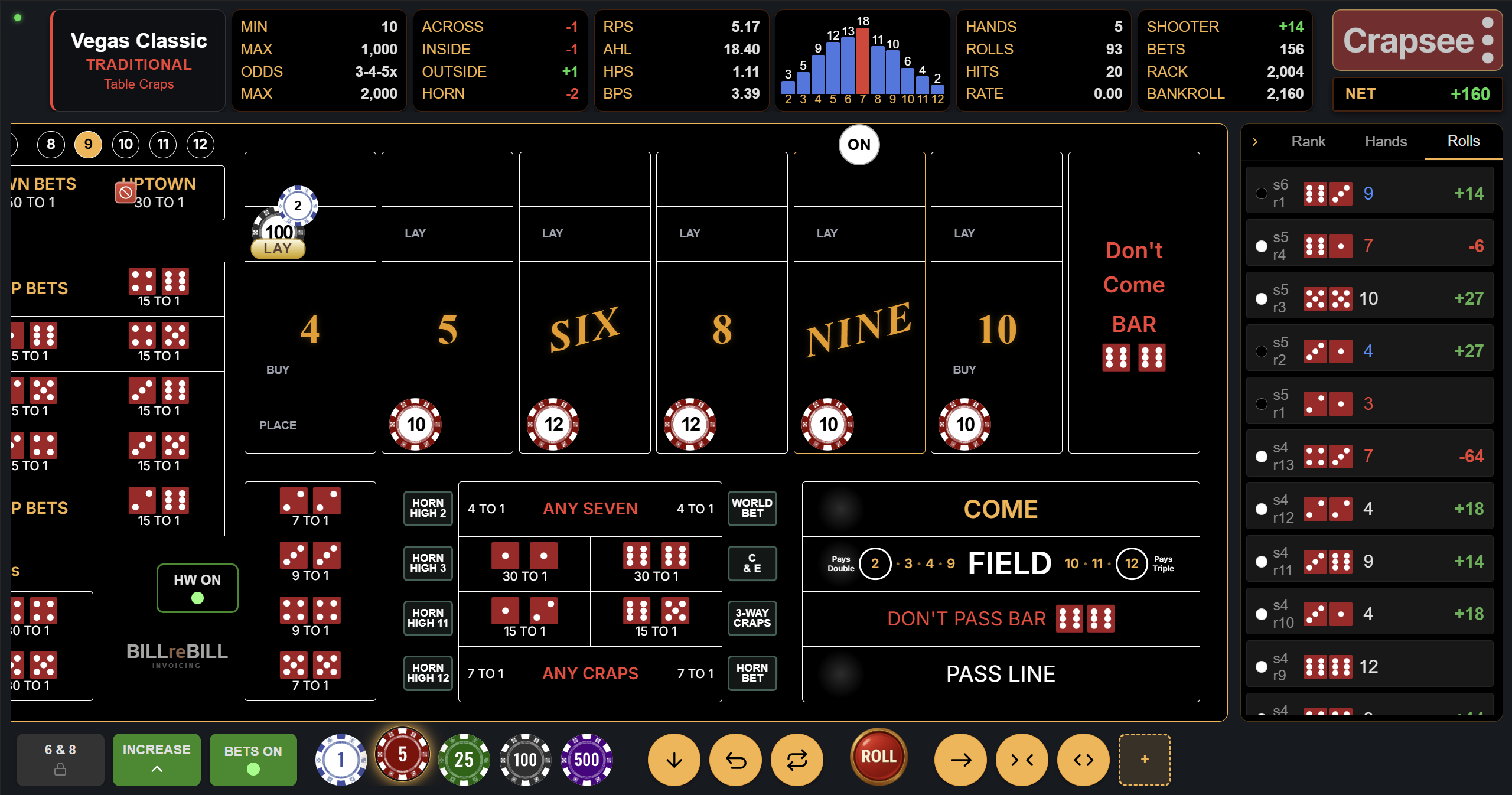
Looking for the best craps app? Crapsee is a free, browser-based craps app that works on iPhone, Android, tablet, and desktop without any download. No App Store, no signup, no real money, no banner ads over the layout. Cryptographically secure dice, every casino bet type, full layout. Add to your home screen once and launch in one tap going forward.
What makes the best craps app
- No download friction. A good craps app should let you start playing in under 10 seconds.
- Free to play, with a one-time way to go ad-free. Pay-to-play or ad-heavy craps apps interrupt the flow.
- Honest random dice. Cryptographic RNG, not a tweaked pseudo-random function that favors the house.
- Every bet type. Missing bets means incomplete practice.
- Works on any device. iPhone, Android, desktop - same experience everywhere.
What to look for in a craps app
Most "top craps app" lists optimize for App Store rankings and monetization, not quality of practice. The features that actually matter:
1. Honest random number generation
Dice rolls should be cryptographically random or pulled from a licensed gaming RNG. An app using Math.random or a simple pseudo-random function may drift from true probabilities over long sessions. Your practice on such an app teaches the wrong math.
2. Accurate casino payouts
Pass Line 1-to-1, Place 6/8 7-to-6, Hardway 6/8 9-to-1. Any deviation from these rates means the app is lying about house edge. Verify payouts match standard craps odds before trusting the app for practice.
3. Complete bet coverage
A real craps table has 30+ bets. An app missing proposition bets, hop bets, or don't-side bets cannot teach you the full game.
4. Minimal install friction
App Store apps require download (50MB+), account signup, terms acceptance, and updates. Browser-based apps (PWAs) install with one tap and update automatically.
5. Nothing pinned over the layout
Banner ads, popups, or sign-up nudges sitting on top of the felt break concentration and usually exist because the app developer monetizes via ads or real-money referrals. Crapsee puts nothing on the layout on any tier. Free tables do pause for a short Crapsee message every so often between rolls, and the paid tiers remove it.
6. Available on every platform
The best craps app works the same on iPhone, Android, desktop, and tablet. Platform-specific apps duplicate effort and force multiple downloads.
Best craps app for iPhone
App Store craps apps generally fall into three categories:
- Free-with-ads craps games. Heavy banner and interstitial ads, often simplified rules. Not suitable for learning.
- Paid craps games. $2-$10 one-time purchase. Usually ad-free but often entertainment-focused rather than simulator-accurate.
- Real-money casino apps. Require account verification, deposits, and are geographically restricted.
Crapsee is a browser-based alternative that avoids all three categories. On iPhone:
- Open Safari (or Chrome) on your iPhone
- Navigate to
v3.crapsee.com - Tap the Share button (square with arrow)
- Scroll down and tap Add to Home Screen
- Confirm name and icon - a Crapsee icon now sits on your home screen like any app
- One tap launches the full craps table in standalone mode (no browser chrome)
Total install time: about 20 seconds. No App Store account required. No review waiting period. Updates happen automatically whenever we ship.
Best craps app for Android
Android has a similar landscape of App Store craps apps, with the added availability of Play Store categorization that sometimes surfaces low-quality apps in the search results.
Install Crapsee as a PWA on Android:
- Open Chrome (or Firefox, Samsung Internet, etc.)
- Navigate to
v3.crapsee.com - Chrome usually shows an "Add Crapsee to Home screen" banner after a few seconds. Tap it.
- Or manually: tap the three-dot menu, then Add to Home screen
- The PWA icon appears on your home screen. One tap launches the app.
On Android, PWAs behave very similarly to native apps - full-screen launch, splash screen, and system-level notifications if enabled.
Free craps apps vs paid craps apps
| Aspect | Free craps apps | Paid craps apps | Crapsee (free PWA) |
|---|---|---|---|
| Upfront cost | $0 | $2-$10 | $0 |
| Ads in game | Usually heavy | Typically none | A short Crapsee message on free tables; none on paid tiers |
| Honest RNG | Varies widely | Varies | Yes (cryptographic) |
| Download required | Yes, 30-100MB | Yes, 30-100MB | No, runs in browser |
| Signup required | Sometimes | Sometimes | No for core game |
| Every bet type | Usually | Usually | Yes |
| Ideal for | Casual fun | Dedicated learners | Both |
The honest answer: a good paid craps app is fine, but a well-built free PWA like Crapsee matches or exceeds them without the upfront cost or download friction. Try Crapsee first; if it doesn't meet your needs, a paid app is still an option.
Why Crapsee is the best free craps app
- Zero install friction. Open in browser, add to home screen, done.
- Cryptographically secure dice. Not pseudo-random, not tweaked. Same RNG primitive that secures online banking.
- Every bet type on a real craps table. 30+ bets from Pass Line to Hop bets with accurate casino payouts.
- Traditional craps and the bubble craps simulator both included free.
- No banner ads on the layout. Free tables pause for a short Crapsee message every so often between rolls; Enhanced and Premium are ad-free.
- Mobile-optimized. Portrait and landscape layouts both work. One-handed play is comfortable.
- Persistent state. Session saves locally, pick up where you left off.
- Cross-platform. Identical experience on iPhone, Android, desktop.
- Optional paid tiers for Crapless Craps, Easy Craps, up to 20 custom tables. Free tier is complete.
- Auto-updates. No Play Store or App Store review delays.
How to add Crapsee to your home screen
iPhone / iPad (Safari)
- Navigate to
v3.crapsee.com - Tap the Share button (square with an arrow pointing up)
- Scroll down to Add to Home Screen
- Confirm the name and icon. Done.
Android (Chrome)
- Navigate to
v3.crapsee.com - Tap the three-dot menu in the top right
- Select Add to Home screen (or Install app on newer Android)
- Confirm. The Crapsee icon appears on your home screen.
Desktop (Chrome, Edge)
- Navigate to
v3.crapsee.com - Look for the install icon in the address bar (usually a plus sign or download arrow)
- Click it and confirm. The Crapsee desktop app installs and appears in your applications folder.
In all cases, launching the installed PWA gives an app-like fullscreen experience without any browser chrome visible. Identical behavior to a native app but with zero install overhead.
What makes the best craps app? 5 things to look for
Search for "best craps app" and you will find App Store lists ranked by download count and star ratings padded by casual reviewers. Those metrics do not tell you whether a craps app is accurate enough to actually improve your game. Here is the criteria framework that matters for anyone who wants serious practice.
1. Realistic payouts with correct house edge
Every bet in craps has a known house edge baked into the payout ratio. Pass Line pays 1-to-1 (1.41% edge). Place 6 and Place 8 pay 7-to-6 (1.52% edge). Hardway 6 and Hardway 8 pay 9-to-1 (9.09% edge). A craps app that tweaks those ratios, even slightly, is teaching you the wrong math. After 500 practice rolls on a miscalibrated app, you will have built intuition for an edge that does not exist at a real table.
Crapsee uses the exact casino payout schedule for every bet type. Pass, Don't Pass, Come, Don't Come, all Place bets, Buy bets, Lay bets, Hardways, Proposition bets, and Hop bets are all calculated to the correct ratio. No house-favorable distortion, no inflated payouts to make the app feel generous. What you practice here transfers directly to a real layout.
2. Every bet type on the layout
A real craps table has 30+ distinct bet types. Many craps apps in the App Store ship with a simplified layout: Pass Line, a few Place bets, and maybe the Field. That is fine for an arcade game but useless for practice. The best craps app covers the full layout so you can learn Don't-side play, Come bet strategy, odds bet sizing, and proposition bet exposure without switching to a different app mid-session.
Crapsee includes the complete bet menu. Beginners start with Pass Line. Advanced players can run Don't-side strategies, work odds bets at 3x-4x-5x, and explore the proposition bets they would otherwise never practice. The same craps simulator engine powers every table, so payout math is consistent across bet types.
3. Cryptographically secure RNG
This is the one most apps get wrong and almost no review lists check. JavaScript's built-in Math.random() is a pseudo-random number generator; it produces statistically plausible
sequences but not cryptographically unpredictable ones. Over thousands of rolls the distribution
looks right, but a skilled attacker (or a lazy developer) can seed it to produce non-random results.
A real craps app should use the browser's crypto.getRandomValues() API, the same
primitive that secures banking sessions and password managers. Crapsee uses cryptographic RNG for
every dice roll. You get provably fair dice with no drift from true probability across any session
length. Run 10,000 practice rolls and the seven-out distribution will be exactly what the math
predicts.
4. PWA / no-install architecture
The best craps app is the one you actually open. Anything with App Store friction (finding the app, waiting for download, accepting permissions, waiting for review-delayed updates) adds steps that reduce how often you practice. A progressive web app (PWA) eliminates all of that. Open the URL, tap Add to Home Screen once, and a native-feeling craps icon lives on your home screen forever. Updates happen silently in the background. No storage bloat. No version conflicts.
Crapsee is a full PWA. It works identically on iPhone Safari, Android Chrome, and desktop browsers. The free craps table loads in under two seconds on a typical mobile connection. If you have tried bubble craps at a physical casino and want to practice that specific variant on your phone, Crapsee covers it without a separate download.
5. Genuinely free practice mode
"Free" means different things across the craps app landscape. Free with banner ads every three rolls. Free for the first 50 rolls then a paywall. Free but nudged toward a real-money partner site after every session. None of those are free in any meaningful sense.
The best free craps app gives you unlimited practice that never runs out. Crapsee's free tier includes two full tables, a standard craps layout and a bubble craps variant, with no roll limits and no paywall waiting a few rounds in. The virtual bankroll refills so sessions never end on a broke streak. Free tables do pause for a short Crapsee message every so often between rolls; Enhanced (a $19 one-time purchase) and Premium remove it and add advanced table types. The free craps game is complete on its own.
Crapsee meets all five criteria. That is why it consistently ranks as the best craps app for players who want practice that actually transfers. Start with the free craps table; it opens in your browser, no install required, and you can be rolling dice in under 30 seconds.
Frequently asked questions
What is the best craps app?
The best craps app is free, installs with minimal friction, and uses honest cryptographic RNG. Crapsee meets all three - browser-based PWA, no download, no signup, cryptographic dice.
Is Crapsee the best craps app for beginners?
Yes. Zero install friction, no signup barrier, clean bet layout with every type explained, and guides that walk through each bet with direct CTAs to try it.
Is there a free craps app with no ads?
Crapsee free tables pause for a short Crapsee message every so often between rolls. Enhanced (a $19 one-time purchase) and Premium remove it entirely. No third-party ads and no nudges to real-money casino sites on any tier; free accounts see a single Crapsee upgrade panel in the stat row.
Does Crapsee need to be downloaded from the App Store?
No. Crapsee is a PWA that runs directly in the browser. Add to home screen for app-like one-tap access without any App Store involvement.
Is the Crapsee craps app real money?
No. Simulator only. No deposits, no cash-outs, no risk.
Best craps app for iPhone?
Crapsee works perfectly on iPhone via Safari. Open the URL, tap Share -> Add to Home Screen. Full craps table in one tap going forward.
Best craps app for Android?
Crapsee works on all Android browsers. Open in Chrome, use the Add to Home Screen prompt or menu option. PWA behaves like a native Android app.
What is the best craps app for learning?
A true simulator with accurate math. Crapsee is built as a simulator first - cryptographic dice, casino-accurate payouts, every bet type. See our craps simulator guide.
What is the best free craps app to practice strategy?
Any free app with honest RNG and accurate payouts. Crapsee adds ghost-chip betting for instant feedback. Run 1,000-roll strategy tests without wasted rounds.
Best craps app with Bubble Craps?
Crapsee includes both traditional craps and Bubble Craps free. See Bubble Craps for variant details and payouts.
What's the best free craps app?
The best free craps app is one that gives you unlimited practice with accurate payouts and nothing blocking the layout. Crapsee is free on its core tables: no roll limits, no mid-session paywalls, no banner ads over the felt. Free tables pause for a short Crapsee message every so often, and the paid tiers remove it. It runs as a PWA in any browser so there is nothing to download. The free craps game includes both traditional craps and bubble craps, covering the two formats most players encounter at a physical casino.
Is there a craps app that doesn't require download?
Yes. Crapsee is a progressive web app (PWA) that runs entirely in your browser, with no App
Store, no Play Store, no download. Open v3.crapsee.com on any phone or desktop
and you are playing immediately. If you want a home-screen icon, tap Add to Home Screen once
in your browser menu. After that, one tap launches the full craps table in standalone mode
exactly like a native app, but without the storage use, update delays, or account
requirements. See the free craps table to try it right now.